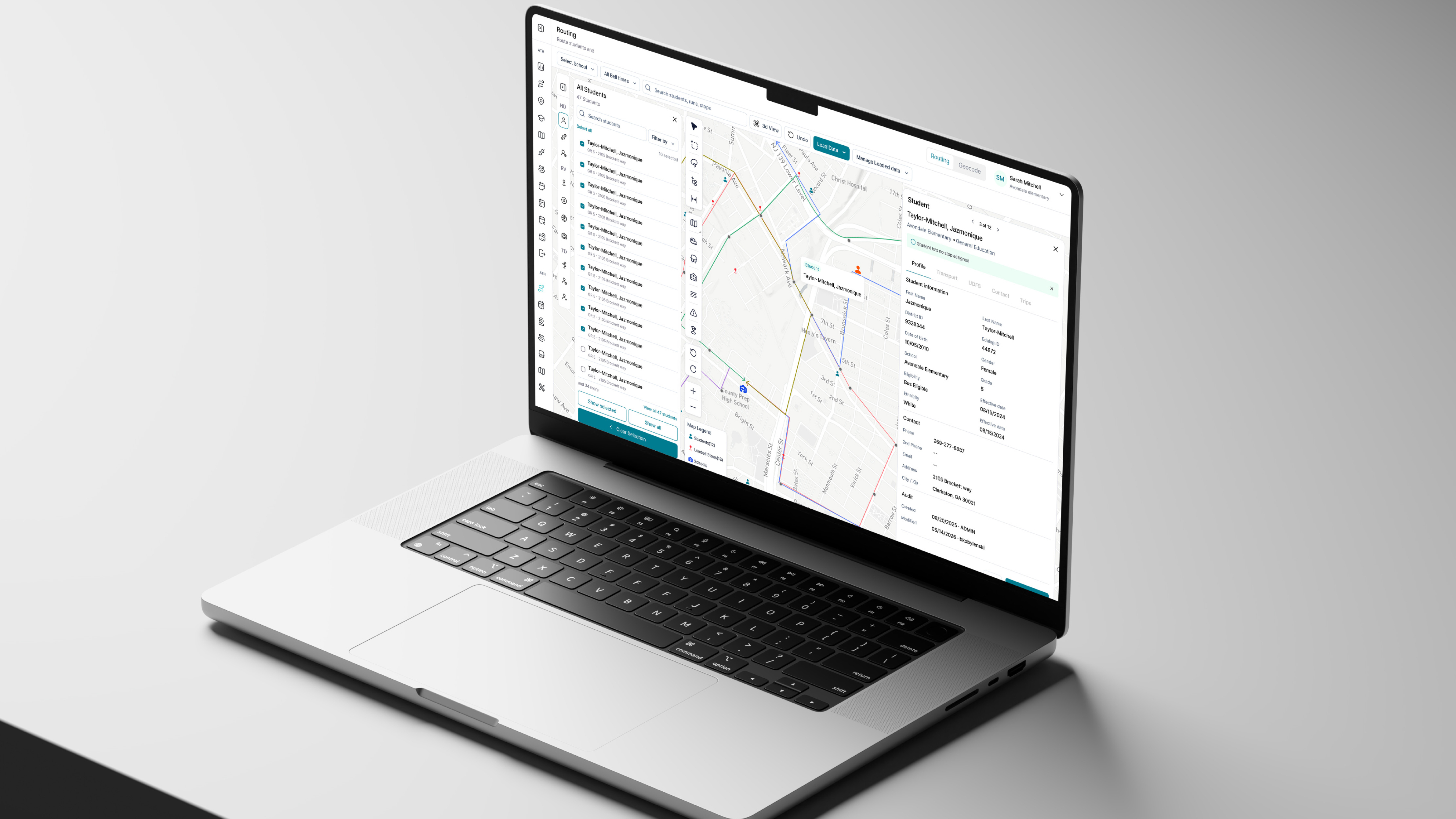
EDULOG Workflow Builder
From approval chains to end-to-end field trip operations
EDULOG Workflow Builder is designed to help school districts configure how a field-trip request moves from submission and approval through scheduling, trip actuals, billing, and payment. The direction gives administrators control over people, decisions, timing, and outcomes without asking them to rebuild the product logic, but it doesn't stop there. It's the prototype for how other tasks in the system will start to work.
Overview
One request crosses many roles, and no two districts organise them in exactly the same way.
EDULOG Trips supports a journey that can involve requestors, administrative reviewers, approvers, coordinators, Routers, transportation staff, billing officers, and finance teams. Some districts require no approval; others use several levels. Work may happen sequentially or in parallel, and the tracked process may end at Completed, Billed, or Paid.
I framed Workflow Builder as an orchestration layer over capabilities EDULOG already owns. It coordinates who acts, which decision is made, and where the request goes next. It does not replace the other processes that already exist.
The primary author is a district or school administrator configuring a reusable workflow template. Each submitted request creates a separate workflow instance. Inside the same Trips environment, role, current stage, and permissions determine what each participant can see and do.
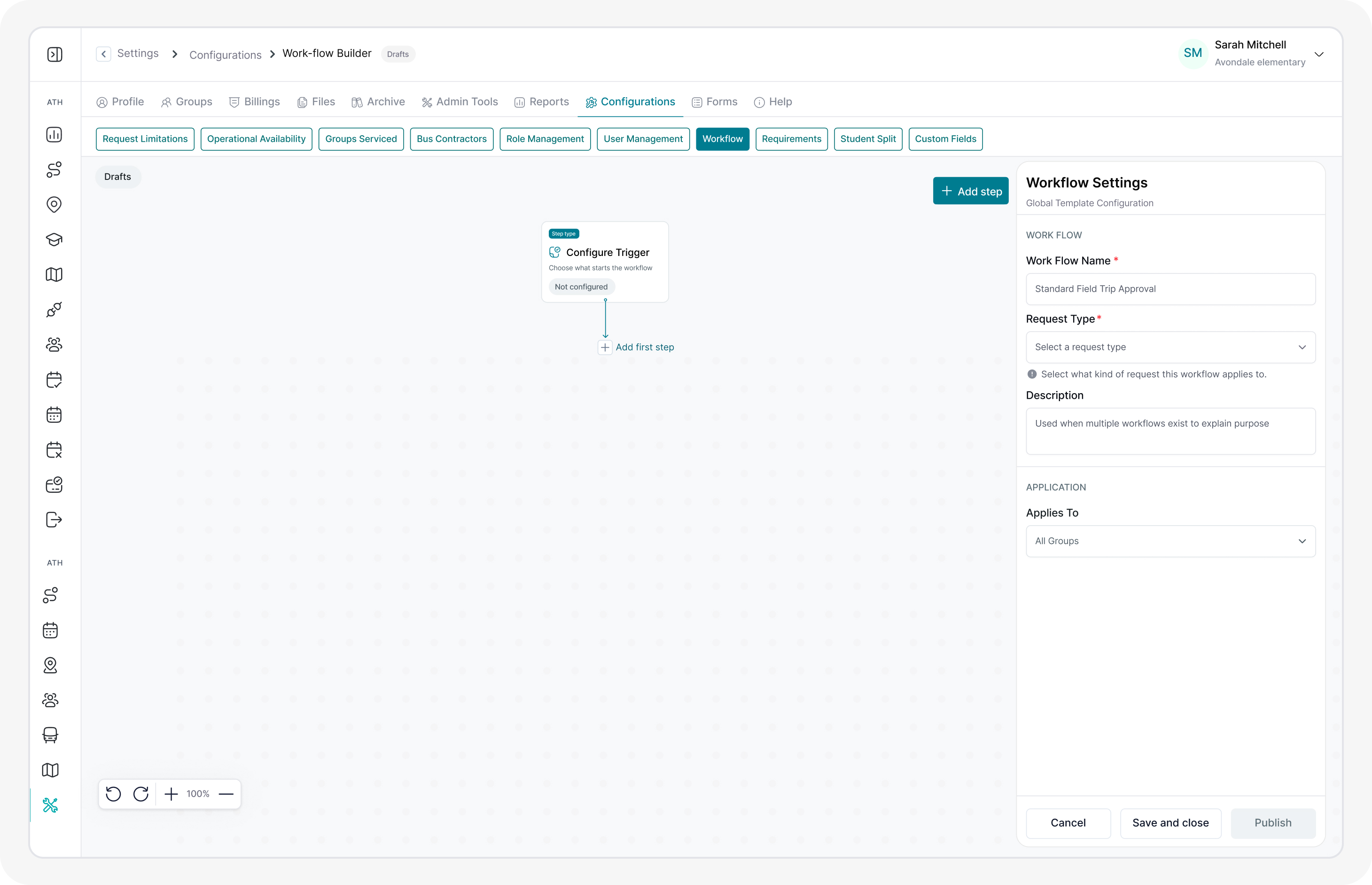
Problems
It behaved like a tool for completing one task, not a builder for defining a process.
There were two problems, and the first produced the second. The research behind the original direction was not deep enough. Without it we were guessing at what districts actually needed to control, and everything built on top of those guesses inherited them.
What districts wanted was specific: a way to define exactly how a field trip is handled in their district, and who is responsible for each part of it. The earlier workflow was too vague to answer that. It addressed a few of those needs, and only loosely: enough to demonstrate a path through a request, not enough to reflect how a real district operates.
Proper research changed the shape of the thing. Buttons became choices. A number of behaviours we had been asking administrators to configure turned out to be things the system should simply do on its own. The original concept didn't feel like a workflow builder; it felt like a tool for completing a task. Dealing with the actual problem meant rebuilding what the product was asking the administrator to decide.
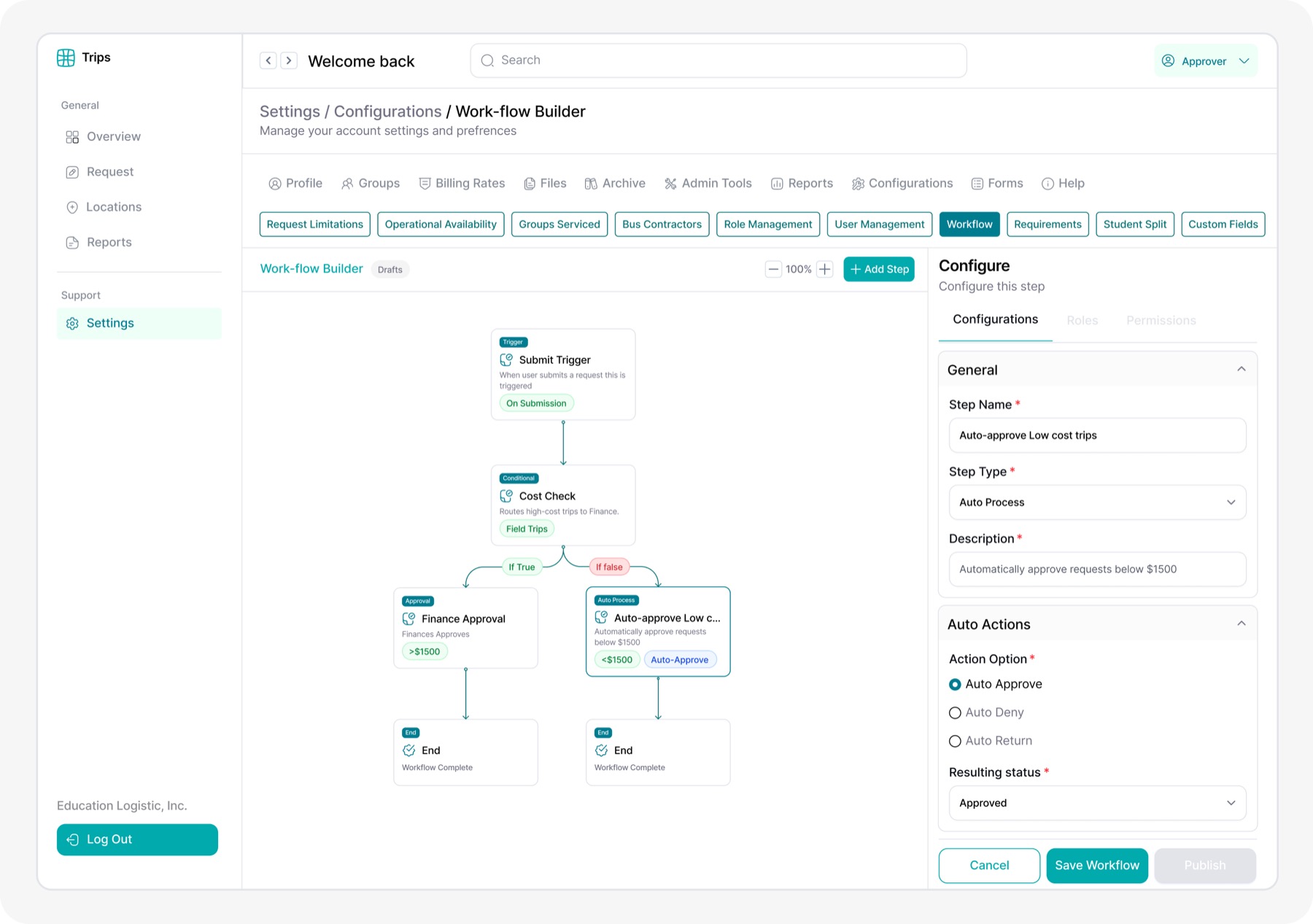
The deeper problem was not the number of nodes. Administrators were being asked to model EDULOG's internal architecture just to adapt their district's process.
Research
The evidence pointed to one boundary: configure the work that varies, preserve the product behaviour that does not.
Research combined stakeholder input, legacy-product analysis, competitive review, and iterative design critique. Together, these inputs expanded the workflow beyond approval into scheduling, actuals, billing, and payment, while clarifying which responsibilities belonged to people and which remained with EDULOG.
Legacy screens established the product's existing data and capabilities (not user preference) while tools such as Power Automate inspired template-led entry, grouped actions, inline insertion, and contextual configuration. Because no formal interviews, usability tests, or analytics were documented, I treated these findings as design insights rather than validated customer outcomes.
The process is larger than approval
The workflow needed to coordinate an operational lifecycle, not end after a decision.
Existing product areas remain the source of truth
Workflow steps should assign work and listen for results rather than recreate forms, calculations, route behaviour, or system emails.
Safe starting points reduce modelling burden
Templates offered a reliable baseline while copy-existing and blank entry preserved advanced flexibility. This was an inferred benefit to validate, not a measured result.
Explorations
The interface became simpler only after the product model became more precise.
Before refining the canvas, I used iterative screens and AI-assisted prototypes to test what the workflow should expose. The challenge was not simply to rearrange nodes. It was to decide which parts of the field-trip operation should remain configurable, and where EDULOG needed to take responsibility.
01From an approval chain to lifecycle orchestration
The workflow needed to coordinate the entire trip, not stop after the first decision.
The first direction focused on Trigger, Condition, Approval, Finalize, and End. It was clear enough as a decision flow, but it stopped before most of the work required to operate and bill the trip.
Expanding the model through scheduling, trip completion, actuals, billing, and payment showed that approval was only one checkpoint. The larger question was whether every product capability should become another node, or whether one reusable workflow language could coordinate the complete operation.
The refined direction connected the full lifecycle while allowing districts to end earlier at valid milestones such as Denied, Completed, or Billed. Built-in product behaviour remained inside EDULOG instead of becoming additional configuration on the canvas.
Refined, end-to-end lifecycle orchestration became part of the workflow language
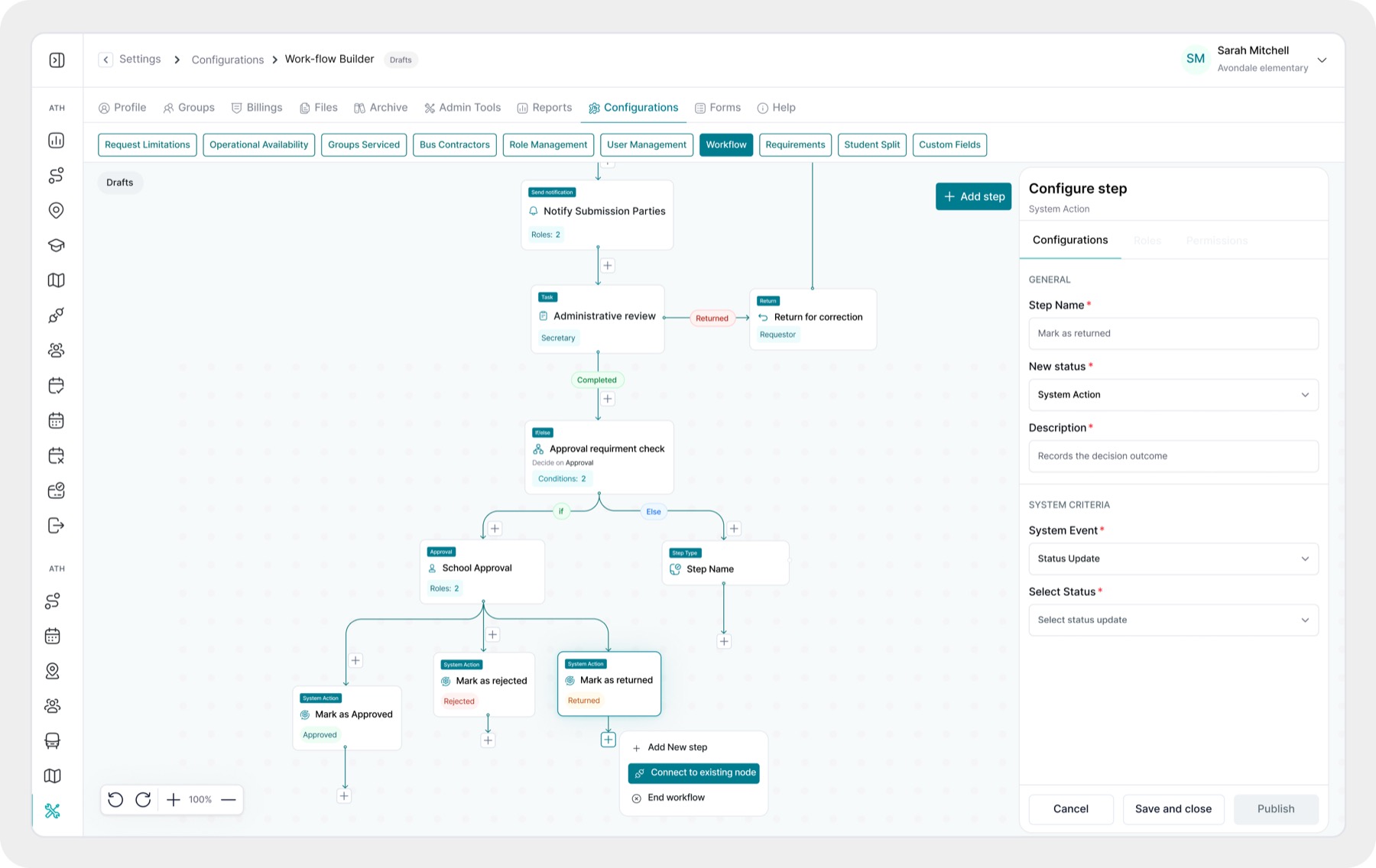
02Explaining actions without slowing people down
Every step needed enough context to be understood, but not so much that the action library became documentation.
I explored two versions of the step actions. One paired every action with a short explanation; the other relied on action names alone. The explanatory version made unfamiliar or similar steps easier to distinguish, but added density. The simpler version was faster to scan, but depended too heavily on administrators already understanding the workflow model.
The refined direction used clear operational names first, with concise explanations wherever the difference between actions could be misunderstood. Familiar actions remained lightweight, while more complex steps received enough context to support a confident choice.
Refined, clear action names and purposeful explanations became part of the workflow language
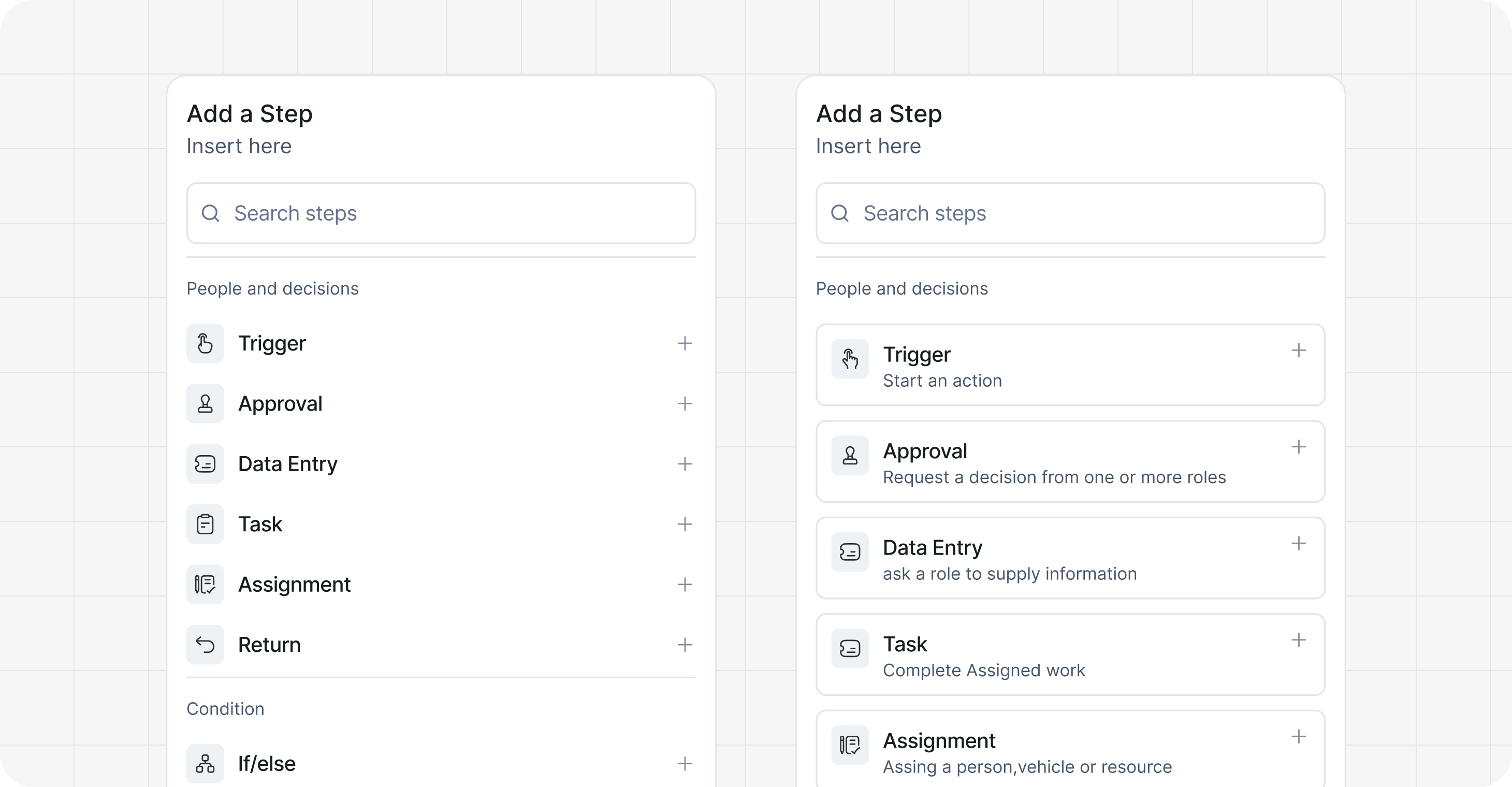
03Making conditional logic clear and safe
Complex rules needed to remain readable without creating broken paths or infinite loops.
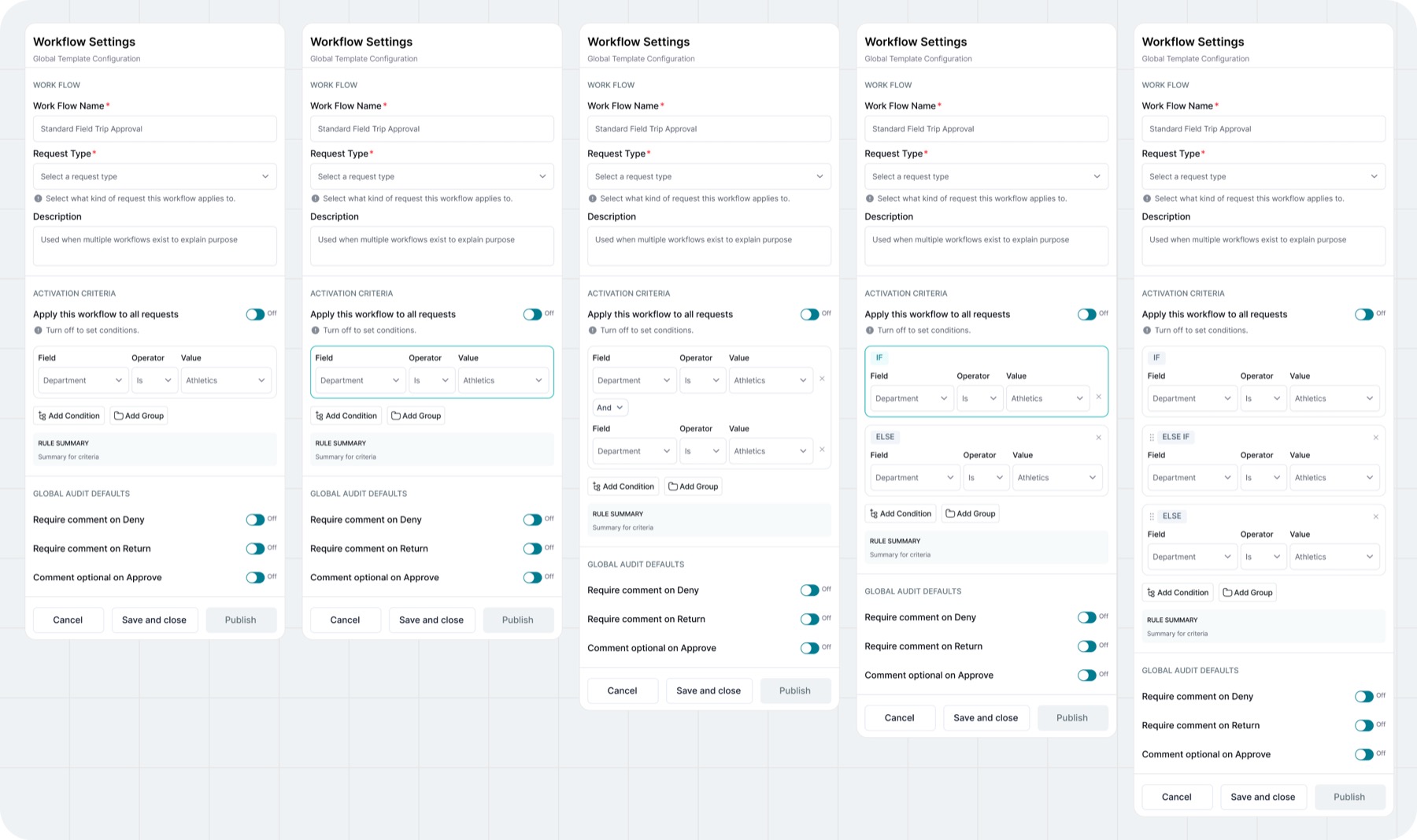
The first condition model used a simple Field, Operator, and Value row. That worked for a single rule, but became difficult to follow when a decision required several clauses or alternative routes. I explored how IF, ELSE IF, and ELSE could remain distinct from the AND/OR logic used inside each branch.
The refined model gives every top-level branch a visible outcome, reveals nested groups only when needed, and requires each path to continue to another step or a valid End. Structural checks were designed to identify incomplete, circular, or unreachable routes before publishing, reducing the chance of a workflow becoming trapped in a loop.
Refined, visible branches, grouped conditions, and loop safeguards became part of the workflow language
04Giving every outcome somewhere to go
A decision is only clear when every possible result and destination can be seen.
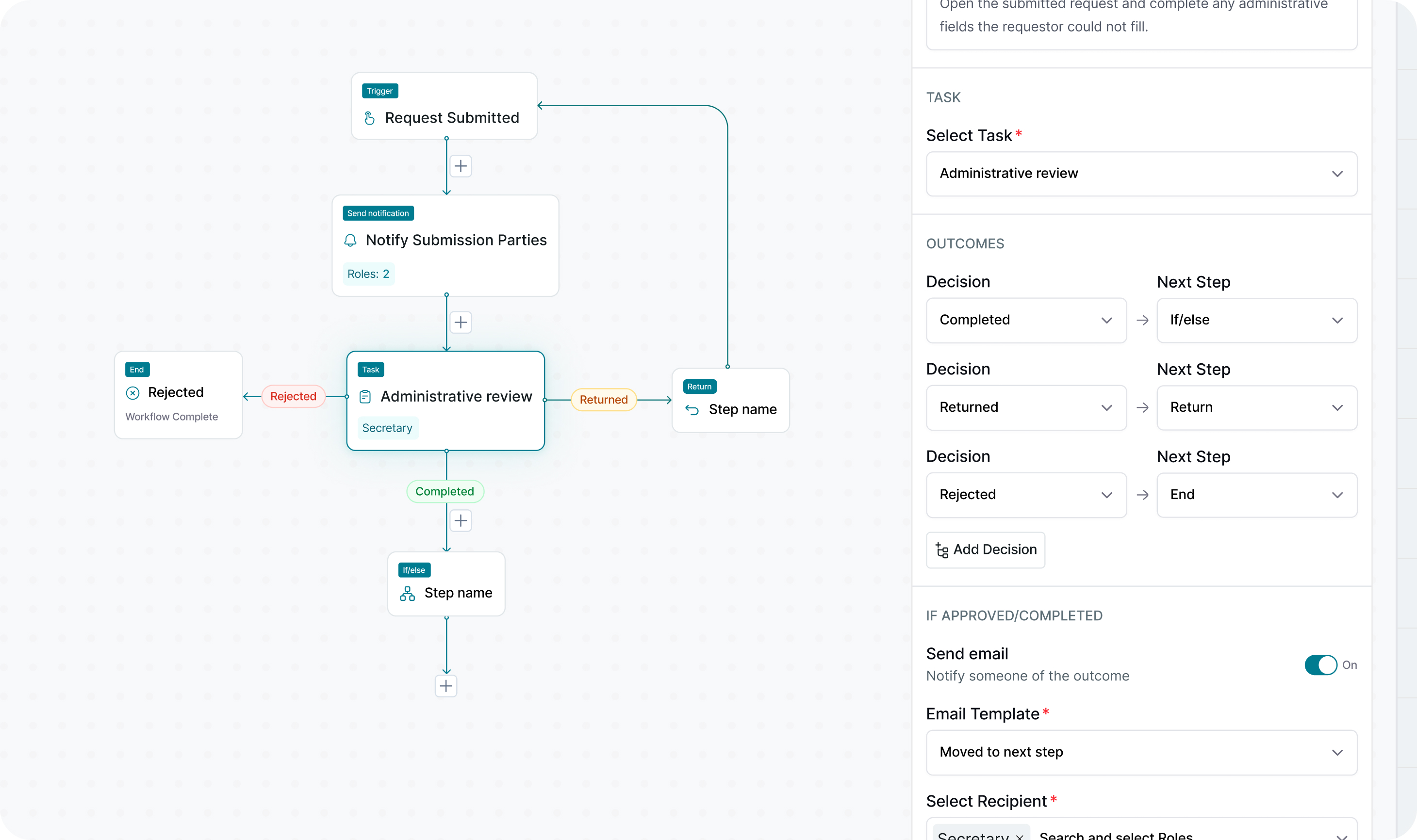
Approvals, reviews, conditions, and returns can all produce more than one outcome. Earlier concepts selected the next step inside the drawer, which mixed two separate questions: what happened, and where should the workflow go next?
I separated outcomes from destinations. Results such as Approve, Deny, Return, Accept for Billing, and Return for Correction became labelled connectors on the canvas. From each connector, an administrator can create a new step, connect an existing compatible step, or end the path.
Applying the same interaction wherever an outcome or decision occurs keeps branching consistent and makes the complete workflow easier to follow.
Refined, visible, reusable outcome routing became part of the workflow language
Together, these four explorations became one consistent workflow language: the lifecycle stays connected, actions explain themselves, conditions remain controlled, and every outcome has a visible path.
Trade-offs
Giving districts enough flexibility without making the builder difficult or risky to use.
The biggest challenge was giving districts enough flexibility without making the builder difficult or risky to use. Every district handles approvals, responsibilities, billing, and final outcomes differently. However, asking administrators to build everything from scratch would require them to understand how the entire system works. I introduced templates as a safer starting point while keeping the options to copy an existing workflow or begin with a blank canvas.
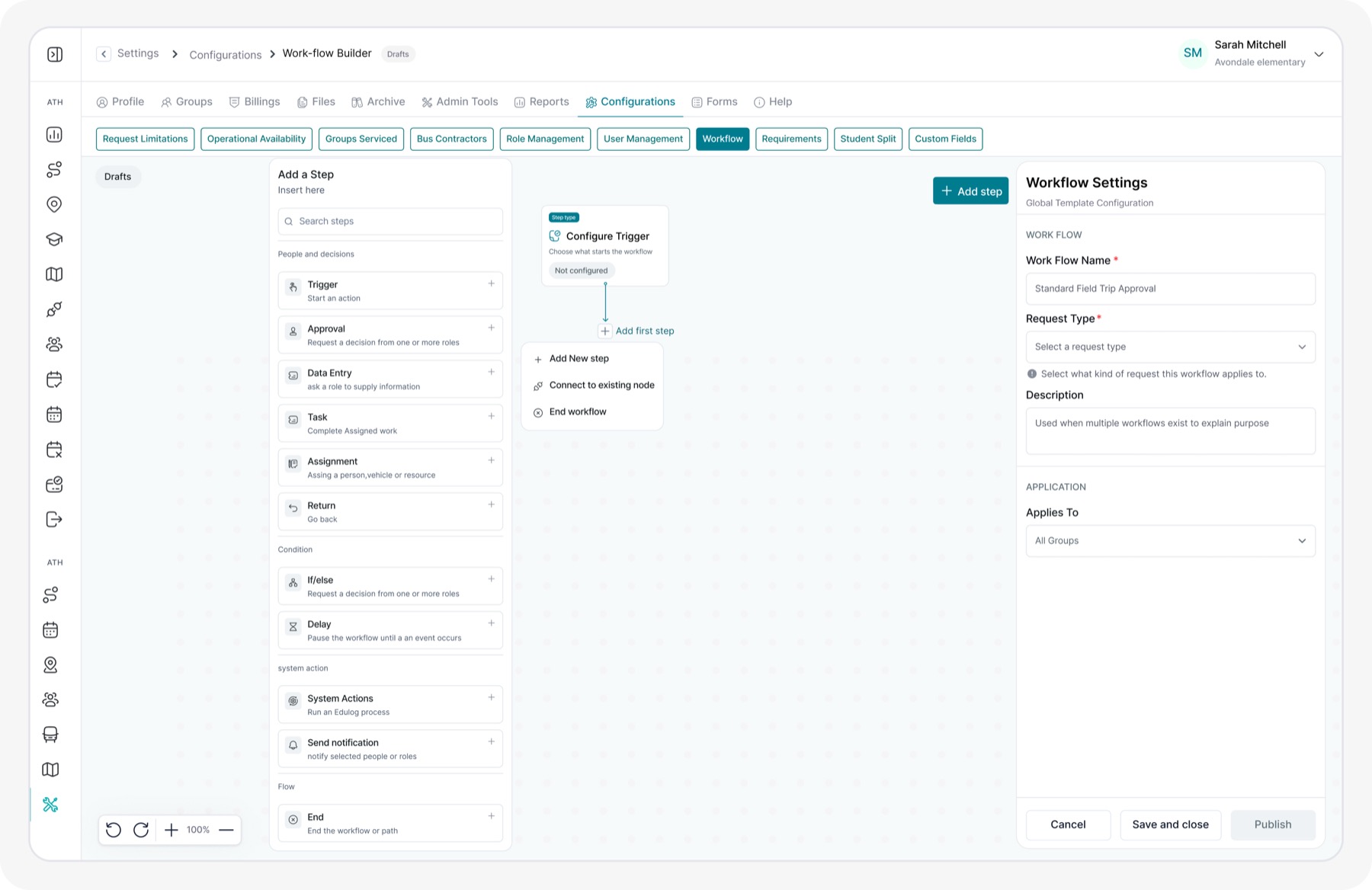
I also needed to show enough information without overwhelming people. Administrators should be able to see what happens after each decision, including where a request goes when it is approved, returned, delayed, or completed. I kept these paths visible on the canvas and placed the detailed settings in a side panel. I also separated what a step does, who is responsible for it, and what that person is allowed to do. Changes that EDULOG already understands happen automatically.
Finally, I designed the workflow steps so they could be reused for other processes in the future. For the initial version, however, workflows only apply to Groups and Departments. The builder also checks for missing information, broken paths, and other problems as the workflow is created, helping administrators correct issues before publishing.
Solution
One workflow builder with the potential to power automation across EDULOG
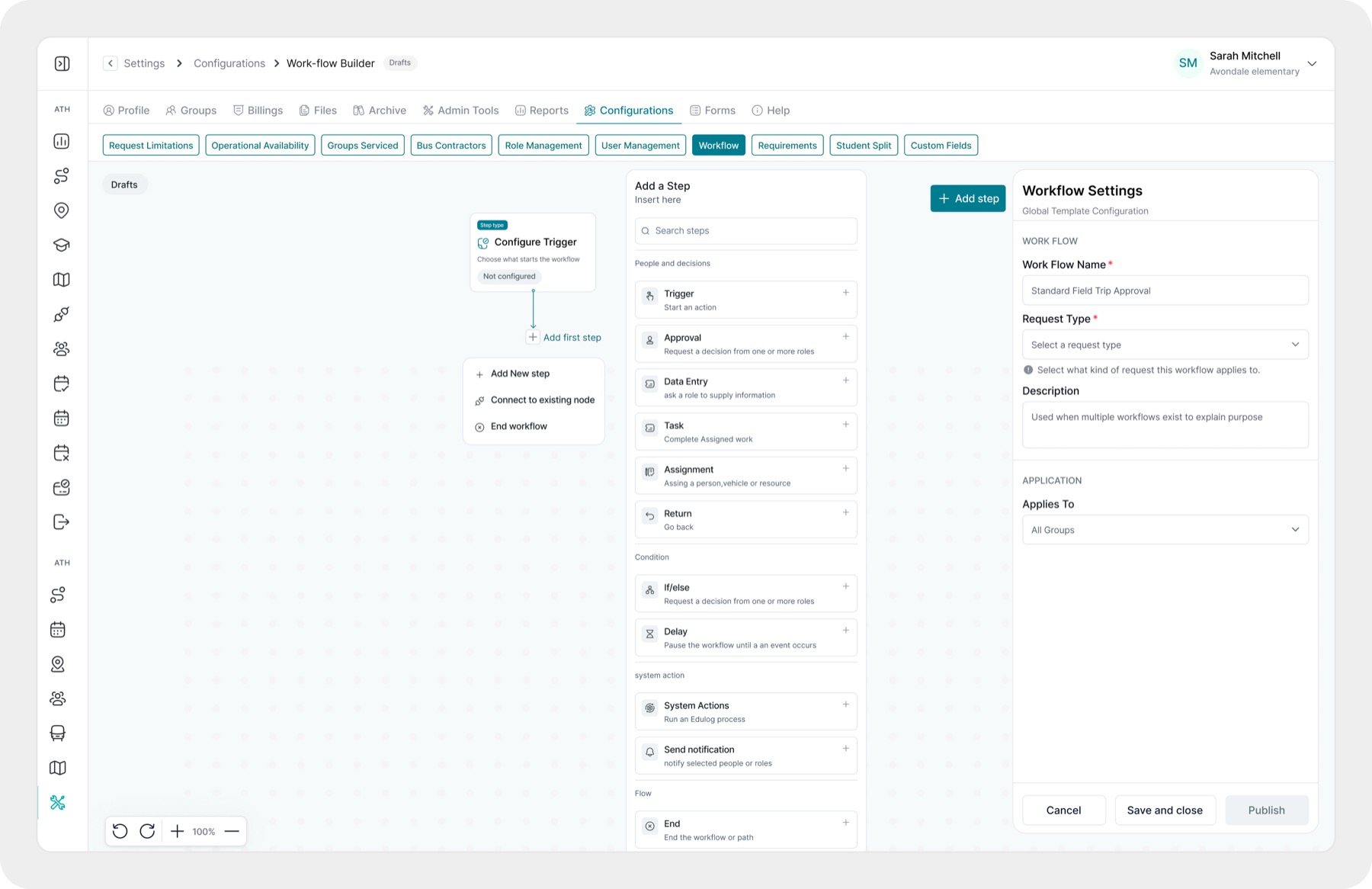
We designed Workflow Builder as more than a tool for managing one field-trip process. The bigger goal was to create a reusable foundation that could eventually support automation across different parts of EDULOG. Instead of building a separate tool whenever a new process needs to be automated, the same workflow building blocks (tasks, approvals, conditions, waits, system actions, notifications, and outcomes) could be combined in different ways. Field trips became the first major use case, but the system was designed with the flexibility to do more as the product grows.
We also wanted the experience to be approachable for people with different levels of experience. Administrators can begin with a ready-made template, copy an existing workflow, or start from scratch. The workflow is displayed visually, steps are organised into clear groups, and selecting a step reveals only the settings needed at that moment. People can assign responsibilities, add backup roles, control permissions, create conditions, pause a process until something happens, and show exactly where each decision should lead. Template sharing could eventually give districts even more useful starting points, although that remains a future direction.
For field trips, the designed workflow brings submission, administrative review, approval, scheduling, trip completion, actuals, billing, and payment into one connected process. It uses capabilities EDULOG already provides, automatically handles system-owned work such as calculations, and can send additional emails when a notification step is added. By connecting these stages, the solution is intended to reduce repeated work, ease the burden on staff, help processes move faster, and keep important business procedures consistent. More importantly, it establishes a foundation that could eventually make automation easier to introduce throughout EDULOG, not only within field trips.
AI in my workflow
AI expanded the possibilities. My role was to decide what the product actually needed.
I used AI as an active design partner throughout the project. It helped me organise an evolving brief, study patterns from other workflow builders, turn requirements into possible flows, and visualise ideas before spending time refining them. I grounded every direction in product feedback, EDULOG's existing behaviour, legacy screens, and the design system.
As the research expanded the workflow from approval into scheduling, actuals, billing, and payment, AI helped me explore a much larger range of possibilities. I used it to compare templates with blank-canvas entry, examine different step types, test how conditions and multiple outcomes could work, and discuss alternative solutions as I designed. It made ideas tangible earlier, giving me more options to question, combine, or reject.
The most valuable part of the process was continuing to probe and correct the output. I repeatedly asked who was actually responsible for each action, whether EDULOG already handled it, and whether administrators truly needed another control. Those questions exposed duplicated forms, unnecessary status nodes, incorrect automation, and an oversized testing system. Removing them helped me turn a wide range of ideas into a more compact solution built around reusable steps, one visual canvas, one contextual drawer, and clear publishing safeguards. AI accelerated the exploration; product judgement shaped the final direction.
Reflection
The hardest design decision was deciding what should not be configurable.
My first mistake was treating every status, form, schedule, calculation, and backend process as a separate workflow step. I assumed that providing more options would make the builder more flexible, but it pushed too much of EDULOG's complexity onto administrators. Separating human tasks, system actions, lifecycle changes, and routing helped me create a simpler model focused only on decisions people genuinely need to make.
Researching products such as Power Automate showed me how templates, grouped actions, inline insertion, and contextual settings could make complex workflows easier to build. I adapted those patterns to EDULOG rather than copying them, transforming the product from an approval tool into a reusable foundation for wider automation. Next time, I would test the core concepts with district administrators earlier and involve product and engineering sooner when defining technical areas such as versioning, integrations, and workflow rules.